
🚨 IMPORTANT: PointClickCare Marketplace "Manage Integrations" access is required to complete the following integration request steps.
Application Name: "VitalCare Health"
Activation Steps
- Login to PointClickCare
- Do one of the following:
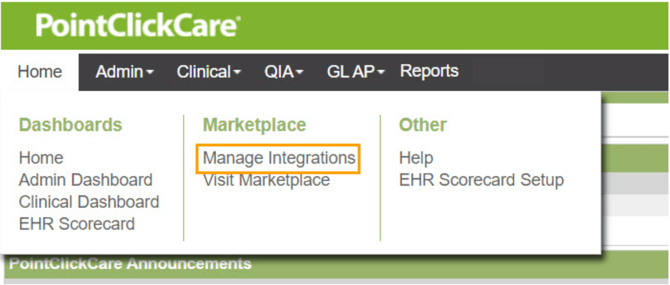
- Single facility: Home > Marketplace > Manage Integrations
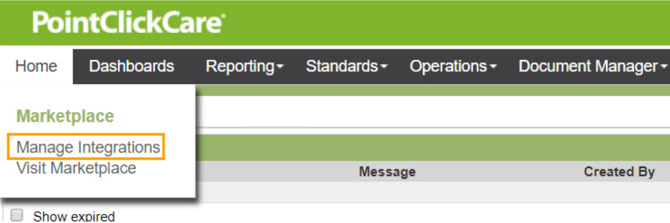
- Multi-facility: Management Console > Home > Manage Integrations
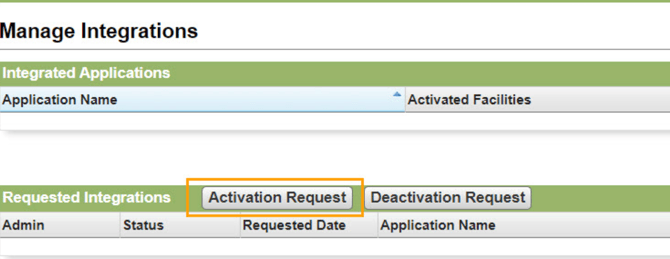
- Click Activation Request
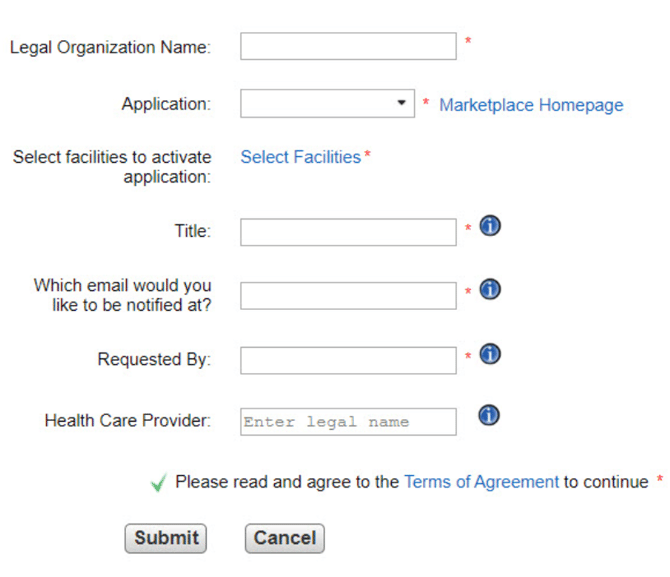
- Complete the following:
- Legal Organization Name - Type your legal
organization name at the time of submitting the
application activation request. - Application - Select an application. (VitalCare Health)
- Select facilities to activate application - Select the
facilities in which the application is installed. - Title - Type the title of the authorized requester.
- Which email would like to be notified at? - Type
email address. This email is used for communication
regarding this request. - Requested By -Type the first and surname of the
requester. Requester must be an authorized signer for
your organization. - Health Care Provider - Type the Health Care Provider
name. - Please read and agree to the Terms of Agreement
to continue - Read the Terms of Agreement and click
Accept.
- Legal Organization Name - Type your legal
- Click Submit
Application View
Single Facility:
Multi-facility:
Activation Request:
Having trouble submitting your integration request? Contact our IT team at: (385)206-6018